A Working Local & Offline LLM Workflow for Coding
Coding workflows have changed dramatically ever since LLMs came out and continued to get better with each release. There is a mad race about AI dominance, and it is a little more than scary. Subscription wars, new tooling, the monstrosity that is OpenClaw getting more GitHub stars than Linux itself… The list is long.
In this madness, I had been wanting to get to a working setup for local LLM usage that actually helps with coding tasks, doesn’t require chaining 5 Mac Minis and won’t take 10 minutes to produce a single line of code. I think I found one. But before I go on talking about my use case and setup here is a TLDR because we all have 5 second attention spans now.
TLDR
- Local LLMs are getting good enough to do most day-to-day coding tasks and they are starting to work on consumer level hardware
- The main issue is tooling. The beast that is Claude Code has a massive system prompt (and also this) and lots of functionality that allows for autonomous development but local tooling isn’t there yet*.
- We need a standard for the repo-wide AI prompt, agent prompts and skill files. (Inb4 the comic below)
- Github repo installation instructions for my exact setup.

Source: xkcd
* For those who are about to tell me to go contribute to the open source tooling projects, I am a data engineer, you don’t want me touching the tooling codebase. I have written React before in a weird time in my life, let’s just say that app got fully refactored.
Use-Case
I have been trying to learn game development as a solo developer. I have a Claude Code subscription but recent controversies around their pricing and usage limits made me want to look for other options that can do the following:
- Assist me in concepts in game development, give me scaffolding and review the basic code that I would be implementing
- Provide me with resources to learn more about Godot specifically
- Help designing the narrative and pacing of the game
What I wouldn’t be doing:
- Launching off subagents to essentially implement the components of the game autonomously
- Bypass permissions dangerously
- Develop large chunks in a single session
The primary goal was to learn and what I needed was essentially a digital mentor / pair programmer. I did not need Claude Opus whatever version for this.
The Hardware
My hardware is very very modest. I run a Nvidia 4060 RTX 8 GB Laptop GPU. I bought this laptop literally to run Vampire The Masquerade: Bloodlines 2 (which I didn’t end up finishing), knowing it wasn’t going to be the most visually demanding game I didn’t even buy the highest grade laptop at the time (2025 Spring), so it is pretty mediocre in terms of GPU. Lowest grade possible for LLMs even.
I have 32GB RAM and an AMD Ryzen 9 8945H CPU. Overall, pretty basic. I was hoping to be able to get to a setup that may be slow but still workable.
The Setup
In order to arrive at my current setup, I tried combinations of several things. List below, and I will review all of them. llama-server model parameters are at the appendix because they matter.
- OpenCode + LMstudio + Gemma 4 26B (reasoning)
- Claude Code + LMStudio + Gemma 4 26B (reasoning)
- llama-server + Pi + Gemma 4 26B (reasoning)
- llama-server + Pi + Qwen3.6 27B (reasoning)
- llama-swap + Pi + Gemma 4 26B (reasoning / no-reasoning) - Winning setup
OpenCode/ClaudeCode - LMStudio - Gemma4
Simply didn’t work. Both Open Code and Claude Code have such massive system prompts, the model just ran out of context window. So I opted for Pi. Pi is a lightweight agent/LLM harness that allows for tool use. It does not allow for creating and running subagents but it has some extensions that might be helpful for that (I haven’t used them).
LMStudio also adds a bit of an overhead due to how abstracted the underlying server is. It is however the easiest to get started with if you are a beginner.
Note: You can use Claude Code with local LLMs as long as they have a presentation layer on top that exposes them in an Anthropic-compatible API. LMStudio does this. You also need to export ANTHROPIC_BASE_URL environment variable with the value pointing to the Anthropic-compatible API endpoint.
Llama Server - Pi - Gemma 4
Pretty decent and working setup. If Gemma 4 is the only model you will use, and you have no plans of switching the llama-server parameters (i.e. enable/disable reasoning for planning vs. execution tasks), this is probably the setup to go. Llama-server is quite fast, has no-to-minimal overhead (unlike LMStudio).
Llama Server - Pi - Qwen3.6
Also a decent setup but much slower than Gemma 4 on inference. I couldn’t use it long enough to actually understand its coding capacities (due to how slow the inference was), so no definitive opinion on the model. If you have more powerful hardware, might be worth checking, I heard good things.
Llama Swap - Pi - Gemma 4
Because I wanted to be able to swap between reasoning and no-reasoning versions of Gemma 4, I opted to use Llama swap with Pi. The installation and the usage is fairly straightforward, I put together a Github repo that probably could have been a Gist.
I also tried Qwen3.6 with this but there was no point including it in here due to how slow it was.
Performance
Overall I am pretty happy with the setup. Pi still has some issues ignoring the minimal repo prompt that exists in the repo. However if you are careful with your instructions and point it towards the repo .md file it works fine.
The bigger issue is Gemma 4’s inference, maybe I need to change the temperature parameter a bit (I am using llama-server default, see appendix) but it can generate corrupted text occasionally, like “Just millintial things” (whatever that means) instead of “Just Millennial Things”. It does get into self-correction loops sometimes but so far it hasn’t gotten stuck at anything.
Here is the prompt processing / generation speeds in tokens per second:
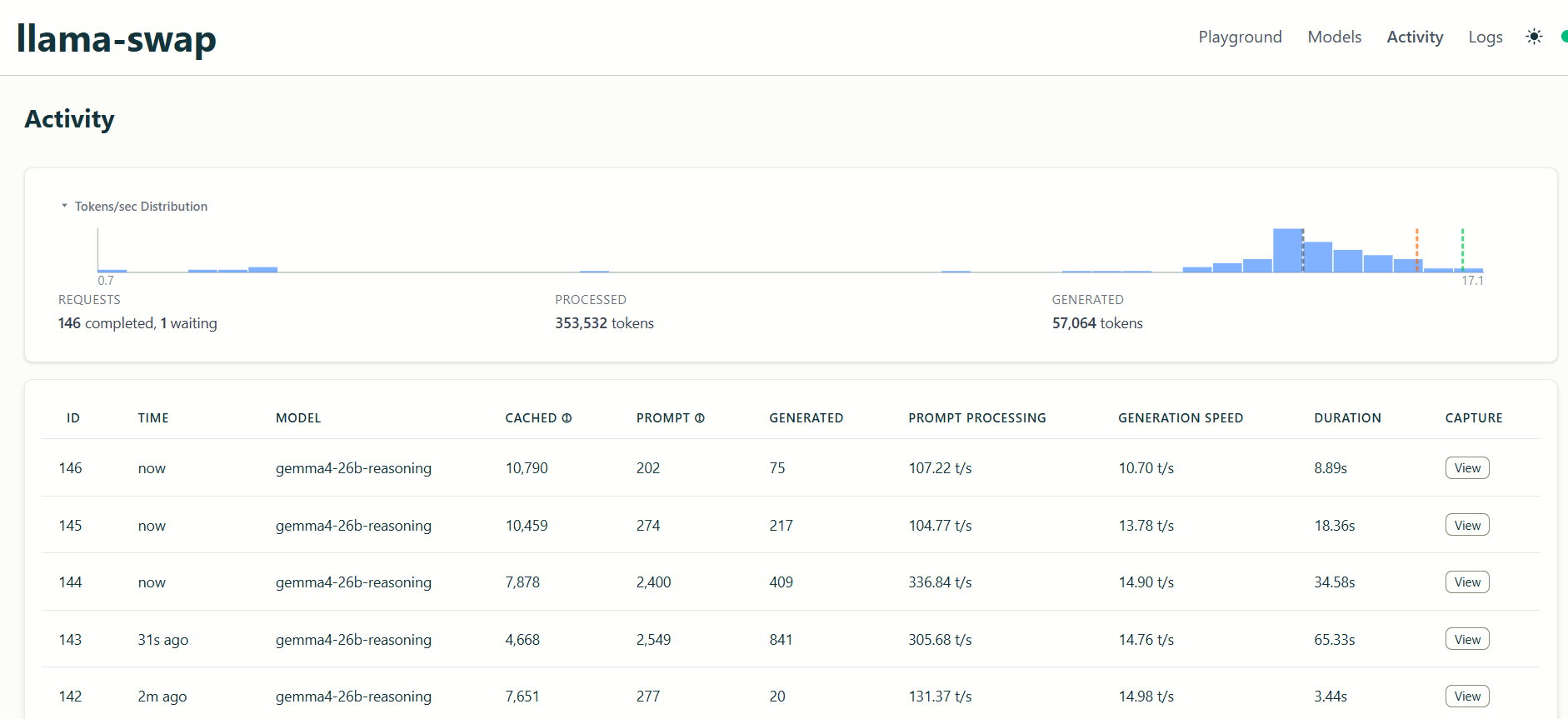
And here is Gemma 4 in action (notice the verbose prompt):
Conclusion
For my guided-coding or tutor/mentor use-case this setup works great. Local LLMs are still quite far from flagship model capabilities but that is to be expected and will always be the case, they are called “flagship” after all. It is not (yet) a “set it and forget it” setup. But I do believe we are not far from a future where local models will be viable coding assistants for most day-to-day coding tasks. In cases where we want to launch a fleet of agents to autonomously build and ship features, sure, the choice is the flagship model but I pose the following question:
Why and how often do we need that level of development speed/autonomous agent capacity?
As a society we are obsessed with using the best and the newest of everything when in reality we probably don’t need that. What we need is a tool fit for purpose.
While I use Claude Code and Anthropic’s various models to manage my workflow in my day job (putting together my meeting notes pre/post meeting, pulling Jira tickets and implementing them for review, creating PRs, reviewing my own code, and most often as a rubber duck) and they have made me way more productive, the real bottleneck is (and always has been) arriving at comprehensive requirements, code review, integration and user adoption (all of this unfortunately means I spend a lot more time writing Jira tickets). I use Opus for tickets that have widespread integrations with rest of our application and heavy downstream implications mostly because it has the 1M context window. For smaller fixes and isolated feature development (i.e. changes in a single data model) I am perfectly fine using smaller models. Unless we are developing a whole new data product, this is most of my day to day work. This type of work can absolutely be done by a local model provided the tooling around it allows.
So, in theory, if I had a harness that didn’t have a gigantic system prompt but could still do a lot of what Claude Code can, it may very well be possible to use Gemma 4 for all the tedious work. You just escalate to the flagship model when you truly need to autonomously implement a big feature that has wide downstream implications.
(I feel like I will get flack because Codex or whatever has the capability to work with local models and I haven’t explored it but whatever)
All in all, I believe that these models will continue to get more capable, much like the flagship models did, and eventually we will have unified and abstracted tooling to allow us to use the said models on our local hardware. Keep in mind this does not reduce the need for the data centers all that much since we only get to do inference in our local machines. The training and the experimentation will remain in the data center side. The breakthrough there will be through different model architectures and training methods like Nested Learning.
Appendix - Model / Llama-Server Parameters
{
    ctx_size: 128000,
    mmap: false,
    temperature: 0.80,
    top-k: 40,
    top-p: 0.95,
    min-p: 0.05,
    fit: "on"
}
Most of these are llama-server defaults — the ones I actually changed are ctx_size, mmap and fit. There are a whole bunch of other arguments you can pass, listed here.
ctx_size: 128000 — Context window in tokens (prompt + generated output combined). I couldn’t really be bothered to make it a power of 2. Gemma 4 26B allows for 256k context length if you have the hardware to support it. Passed to llama-server with -c 128000
mmap: false — Whether to memory-map the model file from disk instead of loading it fully into RAM. Default is true, which is friendly when RAM is tight but introduces disk I/O during inference. With 32GB available and a model that fits, I’d rather load it fully and pay the upfront cost than get random latency spikes mid-generation. To pass this into the llama-server you would use --no-mmap cli arg.
temperature: 0.80 — Sampling randomness. Higher = more creative/varied, lower = more deterministic. 0.80 is llama-server’s default and leans a touch creative. For coding you’d usually want this lower (~0.2–0.4) to keep the model focused. I’m still on the default, which probably explains some of the “millintial” gibberish I mentioned above. Llama-server default, Gemma 4 model card actually recommends to have this as 1.
top-k: 40 — At each step, only sample from the 40 most probable next tokens. Cuts off the long tail of unlikely candidates. Default. Recommended 64 by model card.
top-p: 0.95 — Nucleus sampling. From the remaining candidates, keep the smallest set whose cumulative probability sums to ≥ 0.95. Works as a second filter alongside top-k. Default. Same recommendation in model card.
min-p: 0.05 — Drop any token with a probability less than 5% of the most probable token. A more adaptive alternative to top-p — when the model is confident, it filters aggressively; when it’s uncertain, it keeps more options open. Default. Recommended 0 in model card.
fit: "on" — Auto-fit layers to the GPU rather than me manually picking n-gpu-layers. With 8GB of VRAM there’s no universe where the whole model fits, so something has to decide the split — I’d rather it be automatic than me eyeballing layer counts every time I swap quantizations.